


FHC Project Data

|
|
|
|
The first tab in the project data dialogue will allow you to enter the information which is used as a reference for the project and this information will be printed on the final reports.
When the text label is underlined such as design authority, fluid, welded elbows above and pipe types data file [PDT], these will have an effect on the final calculation so it is important that you accurately complete the information in these fields |
|
|
|
|


|
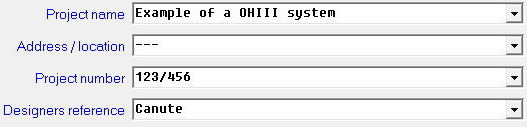
Project Name, Address/Location, Project Number and Designers reference |
|
|
The text entered into the following four drop-down boxes below are used as project reference information only and do not effect the calculation. |
|
|
|
|

|
Design Authority |
|
|
You will need to select the Design Authority (design standard such as NFPA 13, EN 12845...) for the project from those available in the drop-down list. FHC provides a comprehensive list of design authorities / standards from around the world.
You can set the default Design Authority in Preferences -> Options you can also customise the Design Authority drop down list to only display design standards which you use most often use in Utilities -> Design Authority
|
|
|
|
|




|
DWF Button |
|
|
The DWF button will allow you to switch the pressure loss formula from Hayes-William to the Darcy Weisbach and vice versa.
If you switch to the Darcy Weisbach pressure loss formula the following entry will be entered into the fluid field such as 'DWF DENS=998 VISC=0.95' when DENS is the density of the fluid and VISC is the viscosity.
Density is in Kg/m3
This is a command instruction which will instruct FHC to use the Darcy Weisbach pressure loss formula. You can if you wish modify manually the fluid density (DENS unit is Kg/m3) and viscosity (VISC unit absolute viscosity in centipoise) in the fluid type box.
You can set the default pressure loss formula in the Preferences -> Options
|
|
|
|
|


|
Welded fittings |
|
|
You will need to enter the pipe size (in mm) at which you wish to change from screwed fittings to welded fittings; if you leave this entry empty, then FHC will assume that you are only using welded fittings and for this reason, we will always recommend that you enter a value.
Your choice of Design Authority and the Pipe Data Table (PDT) will also determine the equivalent length value. For instance, if you have chosen STD_PIPE.PDT and EN 12845 as the 'Design Authority' then FHC will primarily use the equivalent fitting length given in EN 12845 Table 23. Where the design standards do not provide data for the fitting type, we will use other sources or extrapolate from the data in Table 23.
In the example below, we have entered 65 (mm). Any fittings on pipes above this size will use the welded fitting equivalent length. |
|
|
|
|


|
Pipe types data file [PDT] |
|
|
FHC has a number as standard pipe data type files (PDT) which hold information regarding the pipe material, pipe sizes and equivalent lengths for fitting. You can select the required PDT from the drop-down list otherwise FHC will use the default PDT if set or STD_PIPE.PDT if not set. You can set which PDT you would like FHC project to default to when you start a New FHC Project in Tools -> Preferences menu.
You will find more information about Pipe Data Table and there importance in TDS 2 |
|
|
|
|


|
Cancel Button |
|
|
By pressing the cancel button you will exit the project data without making any changes to this tab. |
|
|
|
|


|
Apply Button |
|
|
By pressing the apply button you will accept the changes you have made and FHC will be updated. |
|
|
|
|


Related Topics
•TDS2: Pipes, fittings and valves
|
FHC - Reference & Tutorial | Version 2.4 |
Copyright © 2015-2025 Canute LLP | www.canutesoft.com |